

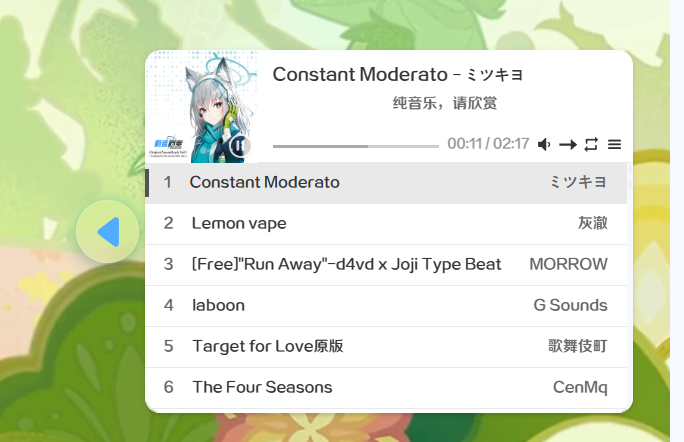
效果展示:
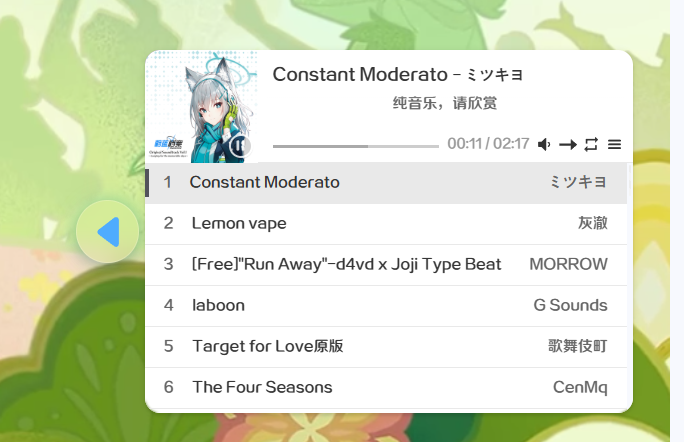
GIF预览:

使用方法:
在管理面板内安装APlayer,然后在插件列表里找到APlayer:

点开它,然后转到“自定义”将这个地址填写进去:
地址1: https://api.i-meto.com/meting/api?server=:server&type=:type&id=:id&r=:r
地址2: https://api.injahow.cn/meting/?server=:server&type=:type&id=:id&r=:r
接下来回到控制台首页,然后找到如图所示的选项:
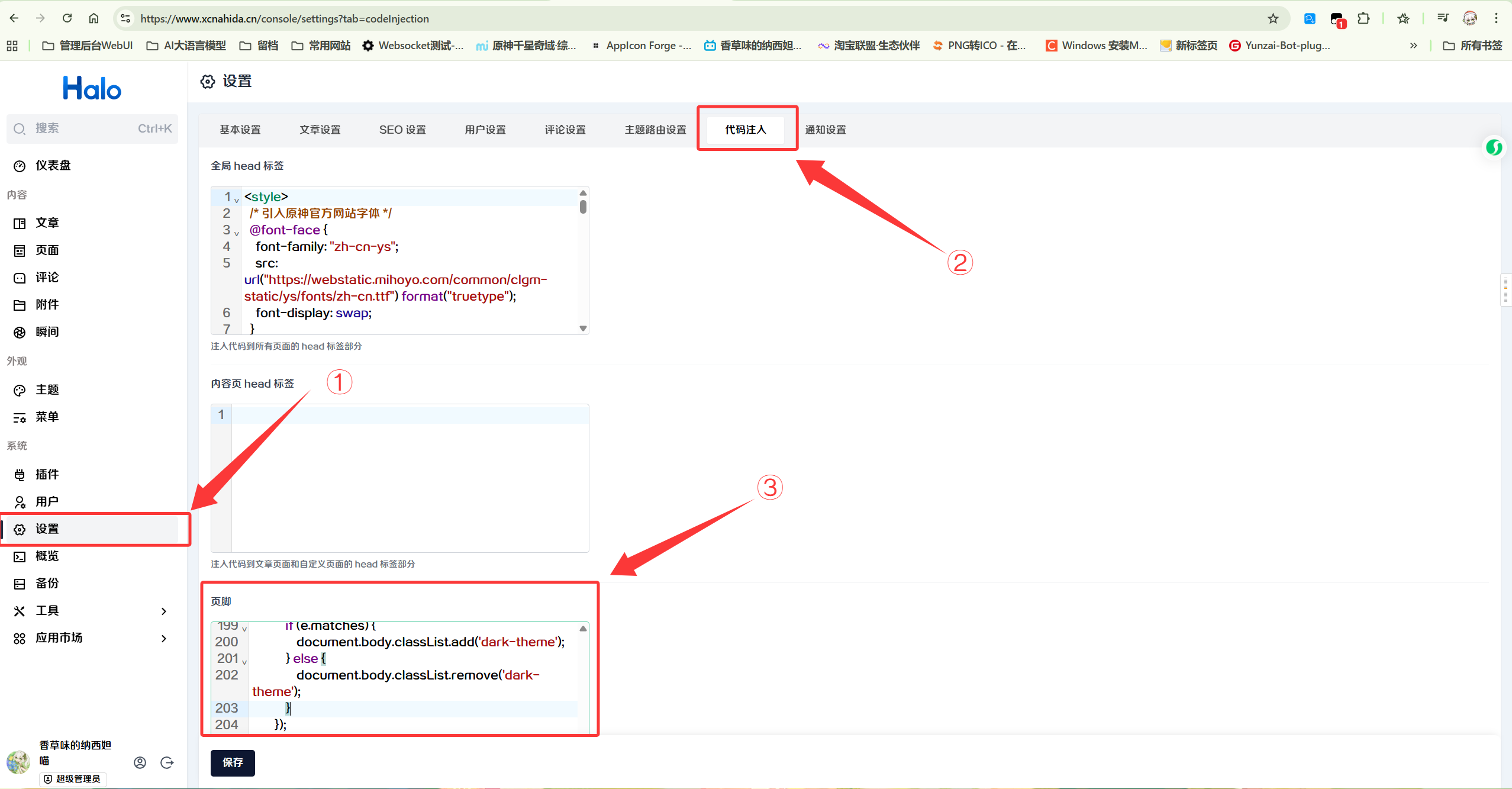
将这个神秘代码填写到页脚输入框:
下列代码样式会自适应手机和电脑的屏幕,然后支持收起展开音乐播放组件,滚动页面自动收起的功能
<style>
    /* 悬浮播放器容器样式 */
    .floating-music-player {
        position: fixed;
        bottom: 20px;
        right: 20px;
        z-index: 9999;
        display: flex;
        align-items: center;
        /* 这个按钮位置各位可以按个人喜好设置 */
        /* flex-direction: row-reverse; 将按钮放在右侧 */
        transition: all 0.4s cubic-bezier(0.4, 0, 0.2, 1); /* 添加平滑过渡 */
    }

    /* 收起状态的样式 */
    .floating-music-player.collapsed {
        /* 收起状态下容器宽度自动调整 */
        transform: translateX(calc(100% - 50px)); /* 只露出按钮部分 */
    }

    .floating-music-player.collapsed .aplayer-container {
        opacity: 0;
        visibility: hidden;
        transform: translateX(20px);
        width: 0;
        margin: 0;
        transition: all 0.4s cubic-bezier(0.4, 0, 0.2, 1);
    }

    /* 播放器容器包装 */
    .aplayer-container {
        transition: all 0.4s cubic-bezier(0.4, 0, 0.2, 1);
        opacity: 1;
        visibility: visible;
        transform: translateX(0);
        width: 390px; /* 桌面端默认宽度 */
        margin-right: 10px;
        overflow: hidden;
    }

    /* 移动端播放器容器样式 */
    .floating-music-player.mobile .aplayer-container {
        width: 300px; /* 移动端较小宽度 */
    }

    /* 收起/展开按钮样式 */
    .toggle-button {
        position: relative;
        width: 50px;
        height: 50px;
        background: transparent;
        color: #f4f4f5;
        border: 1px solid rgba(255, 255, 255, 0.2);
        border-radius: 50%;
        cursor: pointer;
        display: flex;
        align-items: center;
        justify-content: center;
        transition: all 0.4s cubic-bezier(0.4, 0, 0.2, 1);
        backdrop-filter: blur(10px);
        -webkit-backdrop-filter: blur(10px);
        box-shadow: 0 4px 12px rgba(0, 0, 0, 0.1);
        flex-shrink: 0; /* 防止按钮被压缩 */
        z-index: 2; /* 确保按钮在最上层 */
        overflow: hidden;
    }

    /* 按钮背景层 - 用于渐变效果 */
    .toggle-button::before {
        content: '';
        position: absolute;
        top: 0;
        left: 0;
        right: 0;
        bottom: 0;
        background: linear-gradient(90deg, #00b09b 0%, #96c93d 100%);
        opacity: 0;
        transition: opacity 0.3s ease;
        border-radius: 50%;
        z-index: 1;
    }

    /* 收起状态下的按钮样式 - 透明毛玻璃 */
    .floating-music-player.collapsed .toggle-button {
        background: rgba(255, 255, 255, 0.1);
        backdrop-filter: blur(10px);
        -webkit-backdrop-filter: blur(10px);
    }

    /* 收起状态下按钮背景层隐藏 */
    .floating-music-player.collapsed .toggle-button::before {
        opacity: 0;
    }

    /* 展开状态下的按钮样式 - 渐变背景 */
    .floating-music-player:not(.collapsed) .toggle-button::before {
        opacity: 1;
    }

    /* 展开状态下的按钮边框阴影增强 */
    .floating-music-player:not(.collapsed) .toggle-button {
        border: 1px solid rgba(255, 255, 255, 0.3);
        box-shadow: 0 4px 12px rgba(0, 0, 0, 0.2), 0 0 20px rgba(0, 176, 155, 0.4);
    }

    /* 箭头图标样式 */
    .toggle-button svg {
        position: relative;
        width: 24px;
        height: 24px;
        transition: all 0.4s cubic-bezier(0.4, 0, 0.2, 1);
        z-index: 2;
    }

    /* 收起状态下的图标颜色 - 薄荷绿 */
    .floating-music-player.collapsed .toggle-button svg {
        fill: #00b09b;
        filter: drop-shadow(0 0 4px rgba(0, 176, 155, 0.7));
    }

    /* 收起状态下的箭头图标旋转 */
    .floating-music-player.collapsed .toggle-button svg {
        transform: rotate(180deg);
    }

    /* 展开状态下的图标颜色 - 白色 */
    .floating-music-player:not(.collapsed) .toggle-button svg {
        fill: #ffffff;
        filter: drop-shadow(0 0 4px rgba(255, 255, 255, 0.5));
    }

    /* 鼠标悬停效果 */
    .toggle-button:hover {
        transform: translateY(-2px) scale(1.05);
        box-shadow: 0 6px 16px rgba(0, 0, 0, 0.2), 0 0 25px rgba(0, 176, 155, 0.5);
    }

    /* 收起状态下的悬停效果 */
    .floating-music-player.collapsed .toggle-button:hover {
        background: rgba(255, 255, 255, 0.15);
        box-shadow: 0 6px 16px rgba(0, 0, 0, 0.2), 0 0 20px rgba(0, 176, 155, 0.6);
    }

    /* 展开状态下的悬停效果 */
    .floating-music-player:not(.collapsed) .toggle-button:hover {
        box-shadow: 0 6px 16px rgba(0, 0, 0, 0.2), 0 0 30px rgba(0, 176, 155, 0.7);
    }

    /* 按钮按下效果 */
    .toggle-button:active {
        transform: translateY(0) scale(0.95);
        transition: transform 0.1s ease;
    }

    /* 按钮点击波纹效果 */
    .toggle-button::after {
        content: '';
        position: absolute;
        top: 50%;
        left: 50%;
        width: 0;
        height: 0;
        border-radius: 50%;
        background: rgba(255, 255, 255, 0.3);
        transform: translate(-50%, -50%);
        transition: width 0.4s ease, height 0.4s ease;
        z-index: 1;
    }

    .toggle-button:active::after {
        width: 100%;
        height: 100%;
        transition: width 0.2s ease, height 0.2s ease;
    }

    /* 按钮呼吸灯效果 */
    @keyframes pulse {
        0% {
            box-shadow: 0 0 0 0 rgba(0, 176, 155, 0.4);
        }
        70% {
            box-shadow: 0 0 0 10px rgba(0, 176, 155, 0);
        }
        100% {
            box-shadow: 0 0 0 0 rgba(0, 176, 155, 0);
        }
    }

    /* 收起状态下的呼吸灯效果 */
    .floating-music-player.collapsed .toggle-button {
        animation: pulse 2s infinite;
    }

    /* 播放器样式调整 */
    .aplayer {
        border-radius: 8px;
        box-shadow: 0 4px 12px rgba(0, 0, 0, 0.1);
        transition: all 0.4s cubic-bezier(0.4, 0, 0.2, 1);
        overflow: hidden;
        width: 100% !important; /* 确保播放器占满容器 */
    }

    /* 浅色模式支持,其他保持默认 */
    .aplayer {
        --aplayer-progress-played-color: #18B48D;
    }

    /* 暗黑模式支持 */
    .dark-theme .aplayer {
        color-scheme: dark;
        --aplayer-bg-color: #18181b;
        --aplayer-title-color: #f4f4f5;
        --aplayer-artist-color: #e4e4e7;
        --aplayer-lyrics-color: #e4e4e7;
        --aplayer-progress-bar-color: #a1a1aa;
        --aplayer-progress-loaded-color: #98989a;
        --aplayer-progress-played-color: #18B48D;
        --aplayer-time-color: #e4e4e7;
        --aplayer-icon-color: #e4e4e7;
    }

    /* 移动端适配 - 小屏幕设备 */
    @media (max-width: 480px) {
        .floating-music-player {
            right: 10px;
            bottom: 10px;
        }

        .aplayer-container {
            width: 280px; /* 小屏幕设备更小宽度 */
        }

        .floating-music-player.collapsed {
            transform: translateX(calc(100% - 50px));
        }

        /* 移动端调整按钮大小 */
        .toggle-button {
            width: 45px;
            height: 45px;
        }

        .toggle-button svg {
            width: 20px;
            height: 20px;
        }
    }
</style>

<!-- 悬浮音乐播放器容器 -->
<div class="floating-music-player" id="musicPlayerContainer">
    <!-- 收起/展开按钮 -->
    <button class="toggle-button" id="toggleButton" title="收起/展开播放器">
        <svg t="1764823082182" class="icon" viewBox="0 0 1024 1024" version="1.1" xmlns="http://www.w3.org/2000/svg" p-id="1601" width="200" height="200"><path d="M836.510807 434.657683C656.703466 297.433771 476.896125 160.20986 297.110458 22.964274 233.074559-25.888544 140.812869 19.758235 140.812869 100.306592v823.38501c0 80.548357 92.26169 126.196941 156.297589 77.322449 179.785667-137.225717 359.593008-274.447822 539.400349-411.691602 51.01125-38.933061 51.01125-115.711837 0-154.664766z" fill="currentColor" p-id="1602"></path></svg>
    </button>

    <!-- 播放器容器 -->
    <div class="aplayer-container">
        <!-- MetingJS播放器 -->
        <meting-js
            auto="https://music.163.com/#/playlist?id=13472902120"
            theme="#52525b"
            loop="all"
            order="random"
            preload="auto"
            list-folded="true"
            list-max-height="200px"
            list-max-width="100px"
            autoplay="true"
        ></meting-js>
    </div>
</div>

<script>
    // 收起/展开播放器功能
    document.addEventListener('DOMContentLoaded', function() {
        const toggleButton = document.getElementById('toggleButton');
        const playerContainer = document.getElementById('musicPlayerContainer');
        let isCollapsed = false; // 初始状态为展开
        let autoCollapseTimer = null;
        let isButtonPressed = false;

        // 检测是否为移动设备
        function isMobileDevice() {
            return /Mobi|Android|iPhone|iPad|iPod|BlackBerry|IEMobile|Opera Mini/i.test(navigator.userAgent) ||
                   (window.innerWidth <= 768);
        }

        // 初始化移动端检测
        function initMobileDetection() {
            if (isMobileDevice()) {
                playerContainer.classList.add('mobile');
                console.log('移动端设备检测,播放器宽度已调整');
            } else {
                playerContainer.classList.remove('mobile');
                console.log('桌面端设备,使用默认宽度');
            }
        }

        // 窗口大小变化时重新检测
        function handleResize() {
            if (window.innerWidth <= 768) {
                playerContainer.classList.add('mobile');
            } else {
                playerContainer.classList.remove('mobile');
            }
        }

        // 初始化检测
        initMobileDetection();

        // 监听窗口大小变化
        window.addEventListener('resize', handleResize);

        // 按钮点击事件处理
        function handleButtonClick() {
            isCollapsed = !isCollapsed;
            playerContainer.classList.toggle('collapsed', isCollapsed);
            toggleButton.title = isCollapsed ? '展开播放器' : '收起播放器';

            // 如果有自动收起的计时器,清除它
            if (autoCollapseTimer) {
                clearTimeout(autoCollapseTimer);
                autoCollapseTimer = null;
            }

            // 如果展开播放器,设置自动收起
            if (!isCollapsed) {
                autoCollapseTimer = setTimeout(() => {
                    isCollapsed = true;
                    playerContainer.classList.add('collapsed');
                    toggleButton.title = '展开播放器';
                }, 10000); // 10秒后自动收起
            }
        }

        // 按钮按下效果
        toggleButton.addEventListener('mousedown', function() {
            isButtonPressed = true;
            this.classList.add('pressed');
        });

        // 按钮抬起效果
        toggleButton.addEventListener('mouseup', function() {
            isButtonPressed = false;
            this.classList.remove('pressed');
        });

        // 按钮移出时取消按下状态
        toggleButton.addEventListener('mouseleave', function() {
            if (isButtonPressed) {
                isButtonPressed = false;
                this.classList.remove('pressed');
            }
        });

        // 点击事件
        toggleButton.addEventListener('click', handleButtonClick);

        // 触摸设备支持
        toggleButton.addEventListener('touchstart', function(e) {
            e.preventDefault();
            isButtonPressed = true;
            this.classList.add('pressed');
        });

        toggleButton.addEventListener('touchend', function(e) {
            e.preventDefault();
            isButtonPressed = false;
            this.classList.remove('pressed');
            handleButtonClick();
        });

        // 监听页面滚动,自动收起播放器
        let scrollTimer = null;
        window.addEventListener('scroll', function() {
            if (!isCollapsed && window.scrollY > 50) {
                // 防抖处理
                if (scrollTimer) clearTimeout(scrollTimer);
                scrollTimer = setTimeout(() => {
                    isCollapsed = true;
                    playerContainer.classList.add('collapsed');
                    toggleButton.title = '展开播放器';
                }, 100);
            }
        });

        // 检测系统暗黑模式
        if (window.matchMedia && window.matchMedia('(prefers-color-scheme: dark)').matches) {
            document.body.classList.add('dark-theme');
        }

        // 监听系统暗黑模式变化
        window.matchMedia('(prefers-color-scheme: dark)').addEventListener('change', function(e) {
            if (e.matches) {
                document.body.classList.add('dark-theme');
            } else {
                document.body.classList.remove('dark-theme');
            }
        });

        // 点击页面其他地方收起播放器
        document.addEventListener('click', function(event) {
            if (!isCollapsed &&
                !playerContainer.contains(event.target) &&
                event.target !== toggleButton) {
                isCollapsed = true;
                playerContainer.classList.add('collapsed');
                toggleButton.title = '展开播放器';
            }
        });

        // 鼠标悬停时暂停自动收起
        playerContainer.addEventListener('mouseenter', function() {
            if (autoCollapseTimer) {
                clearTimeout(autoCollapseTimer);
                autoCollapseTimer = null;
            }
        });

        // 鼠标离开时重新设置自动收起
        playerContainer.addEventListener('mouseleave', function() {
            if (!isCollapsed) {
                autoCollapseTimer = setTimeout(() => {
                    isCollapsed = true;
                    playerContainer.classList.add('collapsed');
                    toggleButton.title = '展开播放器';
                }, 10000);
            }
        });

        // 添加键盘快捷键支持 (空格键切换播放/暂停,ESC键收起播放器)
        document.addEventListener('keydown', function(e) {
            // ESC键收起播放器
            if (e.key === 'Escape' && !isCollapsed) {
                isCollapsed = true;
                playerContainer.classList.add('collapsed');
                toggleButton.title = '展开播放器';
            }
        });
    });
</script>其中,https://music.163.com/#/playlist?id=13472902120是你的歌单或者歌曲链接,请把它替换成你自己的歌单链接
*可以使用 Ctrl+F搜索
<!-- MetingJS播放器 -->
<!-- 其中,https://music.163.com/#/playlist?id=13472902120 是你的歌单或者歌曲链接 -->
<meting-js
    auto="https://music.163.com/#/playlist?id=13472902120"
    theme="#52525b"
    loop="all"
    order="list"
    preload="auto"
    list-folded="true"
    list-max-height="200px"
    list-max-width="100px"
    autoplay="true"
></meting-js>
一些比较重要的参数详解:
auto: 音乐链接,支持: 网易云netease、QQ音乐tencent、虾米 xiami
theme: 主题色,这里是HEX色号
loop: 循环模式:全部循环 all、单曲循环one、无循环none
order: 播放顺序:列表顺序播放 list、随机播放 random
autoplay: 是否自动播放,true 或者 false
其他的参数可在MetingJS的官方文档中查看:
保存后就可以使用了
其他事项……
PS:偶见在网页内点击链接切换页面的时候,点击收起按钮会无响应,刷新页面后即可解决。这个后续有空再修复吧……
Halo 博客设置播放器教程
https://www.xcnahida.cn/?p=XNOzSQEu
评论